Music AI: MV Video Generator
- 4.5
- Rating
- 5.00M
- Installs
- Free
- Price

 Analysis by App-foxy
Music AI: MV Video Generator caught my attention because it combines several creative tasks that are usually split between different mobile tools. I can use it to work with AI-generated songs, experiment with an AI cover voice, and build a video around the result. That combination makes the first few sessions feel surprisingly productive, especially when I want to turn a rough idea into something I can share without opening a full desktop editor.
After spending time with it, though, my opinion is more measured than the initial excitement. This is a useful playground for quick music experiments and short visual projects, but its lasting value depends on whether you regularly create this kind of content. If you only want a polished song editor, a traditional audio workstation is more precise. If you mainly want ready-made video templates, a dedicated video editor may be easier. This app sits between those choices, and that is both its main strength and its main limitation.
The first week is built around quick creative wins
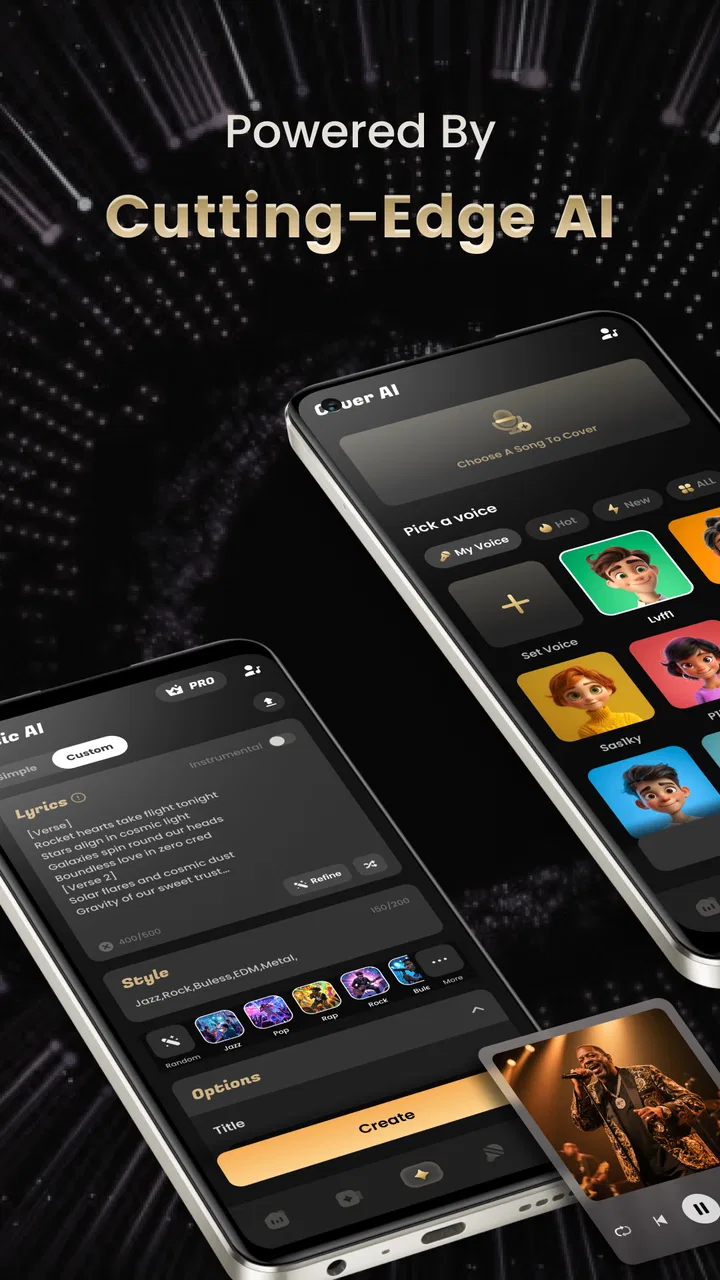
The app belongs to the Music & Audio category, but it does not feel limited to listening or basic playback. Its purpose is active creation. I found the most enjoyable early workflow was to begin with a simple musical idea, generate a song, test how an AI voice treatment changed the character, and then pair the result with a visual sequence. The process encourages experimentation because the barrier between “I have an idea” and “I have something to show” is fairly small.
You May Also Like

 Blood Strike: 2.5 Anniversary
Blood Strike’s Loadouts Turn Every Drop Into a Tactical Gamble
A close look at Blood Strike’s custom loadouts: how fast access to signature weapons reshapes its battle royale rhythm, rewards preparation, and narrows the gap between fights.

 Pandora - Music & Podcasts
Pandora’s Music Is Easy to Start, but Harder to Recover
Pandora’s strength is its low-effort path from a seed to a station. Its weak spot is how much confidence it asks you to place in connection, setup, and quiet recovery.

 8 Ball Pool
 Is Built on Rivalries, Rematches, and Routine
A close look at the rivalries, rematches, shared routines, and unanswered safety questions that turn a quick pool match into a persistent mobile community.

 Samsung Music
’s Quiet Strength Is Playing What You Already Own
Its reach comes less from spectacle than from dependable access to a personal library. That simplicity is both the app’s strongest retention engine and its ceiling.

 AccuWeather: Weather Radar
AccuWeather Review: A Quick, Clear Forecast for Everyday Decisions
For everyday plans, the best forecast is the one you can understand quickly. AccuWeather makes rain timing, radar, and local conditions easy to act on, with a few trade-offs.

 Hill Climb Racing
Why Hill Climb Racing Still Turns Crashes Into One More Run
A tiny car, a bumpy hill and one more upgrade: Hill Climb Racing keeps resurfacing because its simple chaos makes every near-miss feel personal.
More From Our News Desk



That matters for people who are not trained musicians. I do not need to understand chord voicings, microphone technique, or video compositing before trying an idea. Someone planning a birthday greeting, a short social post, a personal parody, or a mood-based clip can start with a concept rather than a technical plan. The app is especially appealing when the goal is a draft, a playful experiment, or a shareable sketch rather than a finished commercial track.
The developer is listed as Video & Music AI - Create Video & Make Songs, which accurately reflects the app’s broad direction. It is not simply a voice effect tool and not only a video maker. The appeal comes from moving between sound and image in one place. During the first week, that variety gives me plenty to try: a different musical mood, another vocal approach, or a new visual treatment can make the same basic idea feel completely different.
The early learning curve is manageable, but the app still rewards a little patience. AI results are not always exactly what I imagined from the first attempt. A vague prompt or an overly complicated concept can produce something that feels unfocused. I get better results when I decide on one clear mood and purpose before starting. “A gentle background song for a travel montage” is a more useful direction than trying to combine several unrelated genres, emotions, and story ideas at once.
One practical tip is to treat the first output as a draft rather than a final answer. Instead of repeatedly changing everything, I adjust one part of the idea at a time. That makes it easier to understand which change improved the result. It also prevents the common AI-creation problem of generating many versions without learning anything from them.
What the music and voice workflow does well
The strongest part of the experience is the way it lowers the cost of trying an idea. With conventional music software, I might spend more time setting up tracks, choosing instruments, editing timing, and correcting a recording than actually exploring the creative concept. Here, the emphasis is different: I can test the overall direction first and worry about refinement later.
The AI cover voice option is useful for people who want to hear a familiar type of vocal presentation without recording their own voice. It can help with demos, humorous projects, character-style experiments, or a rough preview of how a lyric might feel when performed. I would not treat it as a replacement for a carefully recorded human vocal, but it gives an immediate way to explore the performance side of an idea.
There is an important trade-off here. Convenience is high, while control is narrower than in a dedicated digital audio workstation. A musician who needs detailed control over every syllable, take, effect, transition, and mix decision may quickly outgrow this workflow. I also would not choose it as my only tool for preparing a release where consistency and fine editing matter more than speed.
A more useful approach is to use the app at the concept stage. I can create a rough musical identity, decide whether a chorus works, or build a quick soundtrack for a visual idea. If the concept deserves serious development, I can then move toward more specialized tools. That makes the app valuable even when it is not the last step in the production chain.
Turning a song idea into a video
The video side makes the app more practical for everyday sharing. A song by itself may remain unfinished on my phone, while a song attached to a visual sequence feels like a complete piece. This is helpful for creators who want to publish short-form content but do not want to learn a complex timeline editor before testing an idea.
I found that the best results come from planning the video around the music’s emotional shape. A calm track benefits from restrained imagery, while a lively piece needs visual changes that feel connected to its energy. Simply placing random images over a generated song can make the result feel automated. The app can accelerate production, but it cannot replace the basic editorial decision of choosing visuals that support the sound.
One non-obvious workflow is to create the audio before thinking about the final video. When I start with visuals, I am tempted to force the music to match too many scene changes. Starting with the song gives the video a clearer rhythm. I can then select images or scenes that reinforce the strongest moments instead of treating the visuals as decoration added at the end.
This is where the app compares favorably with a standard mobile editor for beginners. A conventional editor may offer more precise trimming and layering, but it assumes I already have media ready to use. Music AI: MV Video Generator is more useful when the missing ingredient is the creative material itself. On the other hand, a dedicated editor remains the better choice when I already have recorded footage and need exact control over cuts, captions, color, or sound mixing.
Who will get real value from it
I think the app is a good fit for casual creators, students working on creative presentations, social media users, hobby musicians, and anyone who enjoys testing ideas without investing in a full production setup. It is also suitable for people who are curious about generative music but do not play an instrument or sing confidently.
A realistic everyday scenario would be preparing a short birthday video during a lunch break. I could create a light song around the person’s personality, try an AI cover voice for a playful performance, and assemble a visual clip from the available material. The result might not have the polish of a professionally edited production, but it could feel personal and entertaining, which is often more important for that situation.
Another useful scenario is a small creator who needs background material for several posts. Instead of searching through the same stock tracks repeatedly, the creator can use the app to explore music that matches the mood of each post. The advantage is not guaranteed perfection; it is the ability to generate a starting point quickly and keep the creative process moving.
I would be less likely to recommend it to a professional producer who needs repeatable results, detailed arrangement control, or a dependable mastering workflow. I would also suggest caution to anyone who expects one prompt to produce a finished music video with no editing judgment. The app helps with creation, but the user still needs to listen, compare, reject weak results, and shape the final presentation.
What changes after the novelty wears off
The app has a strong first-week appeal because every new generation feels like a small discovery. That excitement naturally decreases. After the novelty fades, the question becomes whether I have a repeatable reason to return. For me, the answer is yes only when I connect it to a specific habit, such as making a weekly short video, sketching song ideas, or preparing occasional personalized clips.
Without that habit, the experience can become a cycle of random experiments. I may generate a few songs, try several voices, create a video, and then stop because there is no clear project waiting for the next session. The app is better when it serves a creative routine than when I open it simply to see what the AI can do.
One way to create recurring value is to keep a small list of project prompts outside the app. I might note a video theme, a target mood, a visual concept, and the intended audience before opening it. This simple preparation reduces aimless generation and makes each session more purposeful. It also helps me judge results against a goal instead of accepting whatever sounds interesting in the moment.
The free price makes trying the app straightforward, while optional in-app purchases range from $0.99 to $99.99 per item. That wide range is important for long-term planning. Casual users can explore before deciding whether they want to spend, but frequent creators should pay attention to how quickly paid options become part of their workflow. A free starting point does not automatically mean unlimited practical use for every type of project.
I would not spend simply because an output is almost right. If a result needs many attempts before becoming usable, the cost and time can undermine the convenience that attracted me in the first place. I prefer to define a small creative goal, test whether the app can meet it efficiently, and only then consider whether additional purchases make sense for my routine.
Maintenance, storage, and the effort behind good results
The maintenance burden is not about complicated setup so much as managing creative clutter. AI tools can encourage me to create more versions than I can realistically review. If I keep every song, voice experiment, and video draft, the useful work quickly becomes difficult to find. I get more value when I name projects clearly and remove failed attempts rather than treating every generation as something worth saving.
There is also a quality-control habit that should not be skipped. I listen to the entire result instead of judging it only by its opening seconds. A generated song may begin convincingly but lose direction later. Likewise, a video can look appealing in a preview while feeling poorly matched to the music when watched from beginning to end. A complete review before sharing is one of the simplest ways to avoid an awkward final result.
My recommended workflow is deliberately short: define the purpose, create a first version, change one variable, compare the result, and export only after a full watch and listen. This prevents endless tweaking. It also makes the app feel like a tool rather than a slot machine for endless variations.
Device compatibility is reasonably approachable because the minimum operating system is Android 8.1, so the app is not restricted to only the newest phones. Still, the actual comfort of creative work depends on the device’s screen, storage, and general performance. I prefer working on a phone with enough free space and a stable connection for any generation-heavy task, because interruptions are especially frustrating when I am waiting for a complete audio or video result.
The current version is 1.7.2, and I would keep the app updated if it becomes part of my routine. Updates matter more for an AI creation tool than for a simple offline player because generation behavior, editing reliability, and compatibility can affect whether a workflow remains comfortable. I would also avoid building an important deadline around an untested last-minute project; creative automation is convenient, but it still deserves a backup plan.
Where fatigue begins
The first source of fatigue is inconsistency. AI-generated material can be inspiring, but it may also require several attempts before it fits the intended mood. That unpredictability is enjoyable when I am exploring and tiring when I need a specific result quickly. The more exact my brief becomes, the more I notice the difference between generating an idea and controlling a production.
The second source is sameness. If I use similar prompts, visual choices, and voice treatments, the projects can begin to feel related in an unhelpful way. The solution is not simply to generate more. I need to vary the concept, edit with intention, and sometimes bring in my own recordings or images. The app can provide momentum, but personal decisions are what keep the work from feeling disposable.
Another limitation is the gap between a fast draft and a polished piece. Traditional alternatives take longer because they expose more controls, but those controls are exactly what allow a careful editor to correct timing, balance, transitions, and emphasis. This app is more comfortable when speed and experimentation matter. A mobile audio workstation or a full video editor is better when precision is the priority.
I also think about audience expectations. Friends may enjoy a playful AI cover or an unusual generated soundtrack, while clients or public-facing projects may require a more deliberate creative identity. Before sharing, I ask whether the artificial quality is part of the point. If it is not, I would use the app for brainstorming and then refine the material elsewhere rather than presenting the first output as finished work.
The Everyone content rating makes the app approachable for a broad audience, including families exploring creative tools together. Even so, responsible use still matters. I would avoid treating generated voices as a substitute for permission or personal identity, particularly when a project could confuse viewers about who is performing. The safest creative use is transparent, playful, and focused on making something original rather than imitating a real person deceptively.
How it compares with familiar alternatives
Compared with a normal music player, this app is much more active: I come to it to make material rather than consume it. Compared with a dedicated AI song tool, its advantage is the added path from audio to visual content. Compared with a traditional video editor, its advantage is that the creative starting point can be generated inside the same experience.
Those comparisons also show why it will not replace everything. A music workstation is better for detailed arrangement and mixing. A conventional voice-recording app is better when my own performance is the priority. A mature video editor is better for footage-heavy projects that need accurate cuts and layered adjustments. Music AI: MV Video Generator is most convincing when I want a fast bridge between a musical idea and a presentable visual concept.
That bridge is valuable for short projects because it reduces the number of tools I need to open. It is less valuable when I already have a carefully recorded song, a large video library, or a precise production plan. In those cases, the app may add an extra step rather than remove one.
My long-term verdict
With an average rating of 4.5 from around 168 thousand ratings and more than 5 million installs, the app has clearly attracted a large audience. Those figures suggest that its approachable creative concept resonates with many users, and my own experience explains why: it makes music and video experimentation feel immediate without demanding professional knowledge at the start.
Still, popularity does not decide whether it deserves permanent space on my phone. For me, it earns that space when I have a recurring use case: weekly content, personal music sketches, themed videos, or occasional gifts. In that context, the combination of song generation, AI cover voice experimentation, and video creation is genuinely convenient.
If I only want to play music, edit an existing recording, or produce a highly polished video, I would choose a more specialized alternative. The app is not a complete replacement for those tools, and expecting it to be one leads to disappointment. Its best role is as a fast creative workshop that helps me move from an empty page to a workable first version.
My final recommendation is to try it with a defined project rather than an open-ended test. Make one short song, give it a clear visual purpose, review the whole result, and decide whether the workflow saves you time. Its lasting value comes from repeatable creative habits, not from endless novelty. For casual creators and curious beginners, that can be enough to make Music AI: MV Video Generator a useful companion. For precision-focused musicians and editors, it is better viewed as an idea generator and a convenient first step.
FAQs for Music AI: MV Video Generator
01What is Music AI: MV Video Generator?
Music AI: MV Video Generator is an innovative app that allows users to create music videos with AI-generated visuals. By combining your chosen audio tracks with AI technology, the app generates dynamic and visually appealing music videos, making it easy for users to produce professional-looking content without needing advanced editing skills.
02How does the AI technology work in creating music videos?
The AI technology in Music AI: MV Video Generator analyzes the audio track you provide and generates visuals that synchronize with the rhythm and mood of the music. It uses machine learning algorithms to create animations and effects that complement the audio, ensuring a seamless and engaging video experience.
03Can I customize the visuals in the music videos?
Yes, Music AI: MV Video Generator offers customization options for users who want more control over their video content. You can adjust the visuals, choose different styles, and add effects to match your creative vision. This flexibility allows you to personalize your music videos while still benefiting from AI-generated elements.
04Is Music AI: MV Video Generator free to use?
Music AI: MV Video Generator offers a free version with basic features available for users to try. However, to access advanced tools, premium styles, and additional customization options, you may need to subscribe to their paid plans. This ensures that all users can find a suitable option based on their needs and budget.
05What platforms is Music AI: MV Video Generator available on?
Music AI: MV Video Generator is available for both Android and iOS devices, making it accessible to a wide range of users. You can download it from the Google Play Store or the Apple App Store. Ensure your device meets the app's system requirements for the best performance and user experience.
Pros
- User-friendly interface for beginners
- Wide range of music styles available
- Fast video rendering times
- High-quality output videos
- Customizable video templates
Cons
- Limited free version features
- Occasional app crashes reported
- Requires stable internet connection
- In-app purchases can be pricey
- Ads can be intrusive at times

Music AI: MV Video Generator
Gallery